

The Modern Web Design SEO Playbook – How Speed, UX, and Aesthetics Drive Top Rankings – Life-Changing Results
A comprehensive guide to bridging technical performance, user experience, and visual trust to dominate modern search results.
Part 1: Introduction — The Death of Siloed SEO
For over a decade, Search Engine Optimization (SEO) and web design operated in separate organizational silos. Web designers focused on visual elegance, brand alignment, and interactive polish. SEO specialists focused on keyword density, backlink acquisition, meta tags, and technical site architecture. When search engines were simpler, a site could look dated, load slowly, and provide an infuriating user experience, yet still capture top positions in Search Engine Results Pages (SERPs) purely through aggressive link building and exact-match keyword targeting.
That era is officially over. Google and other modern search engines have evolved from basic keyword-matching algorithms into sophisticated intent-fulfillment engines. Today’s search algorithms evaluate not merely what a page says, but how real human beings experience it. Algorithms now measure how fast page content becomes interactable, whether visual elements shift around unexpectedly during load, whether visitors hit the back button after three seconds, and whether visual cues signal security and authority.
Key Takeaway
SEO can no longer be treated as a layer applied after a website is designed. Web design is now foundational SEO. Modern search engines penalize frictionless visuals that come at the expense of speed, just as they penalize fast sites that deliver terrible user experiences.
When design decisions directly impact bounce rates, session duration, and conversion paths, modern web design becomes one of the most powerful levers for organic search performance. This playbook serves as your definitive guide to aligning technical performance, user experience (UX), and visual web design into a cohesive ranking strategy.
Part 2: The New SEO Triad — Speed, UX, and Aesthetics
To succeed in the modern search landscape, web teams must look at site optimization through a unified framework: The New SEO Triad. These three pillars do not operate in isolation; they reinforce and rely on one another to send positive signals to search engines and users alike. Modern web design must use all of them to reach it’s goals.
The Search Ranking Engine
Fast delivery & rendering reduces early bounce rates.
Seamless navigation keeps users engaged longer.
Polished design builds trust & boosts conversions.
Let’s analyze how each element of the triad contributes to search visibility:
- Speed (Performance): Serves as the gateway. If a site fails to render within milliseconds, users abandon ship before ever evaluating your content or brand value.
- User Experience (Usability): Serves as the engine. Intuitive architecture, accessible controls, and clear visual hierarchy enable visitors to complete their intent smoothly.
- Aesthetics (Trust & Authority): In modern web design this serves as the conversion hook. Professional typography, consistent spacing, and clean layouts instantly communicate credibility, turning casual searchers into engaged readers and customers.
Part 3: Pillar 1 — Speed as a Technical and Experiential Ranking Factor
Google officially made page speed a ranking factor for desktop in 2010 and for mobile in 2018. However, with the full rollout of Core Web Vitals, performance measurement transitioned from simple server response times to real-world, user-centric performance metrics.
Understanding Core Web Vitals (CWV)
Google evaluates user experience performance primarily through three Core Web Vitals metrics:
LCP
Largest Contentful Paint
Measures loading performance. Target: ≤ 2.5s for a good score.
INP
Interaction to Next Paint
Measures visual responsiveness to interactions. Target: ≤ 200ms.
CLS
Cumulative Layout Shift
Measures visual stability during load. Target score: ≤ 0.1.
Design Tactics to Maximize Speed Performance
Achieving fast loading times requires strategic design and asset management decisions early in development:
- Modern Image Delivery: Convert traditional JPEG/PNG graphics to next-generation formats like WebP or AVIF. Utilize responsive image attributes (
srcset) so mobile screens download scaled-down image dimensions. You have to do that in modern web design - Dimension Reservation for Dynamic Media: Always specify strict
widthandheightattributes on images, video containers, and ad blocks to eliminate visual jumping and maintain low CLS. - Font Optimization: Limit custom web font family weights. Implement
font-display: swap;in your CSS so readable text renders immediately using system fonts while custom fonts load in the background.
Part 4: Pillar 2 — UX and Behavioral SEO
While speed gets searchers through the front door, User Experience determines how long they stay and whether they return. Search algorithms monitor real-time user behavior to determine whether page visits satify search intent. This is crucial in modern web design – make the visitors satisfied and you are on a very good way that they will come back for more !
Key Behavioral Signals and Design Remedies
| Behavioral Metric | What It Signals to Search Engines | Design Solution |
|---|---|---|
| Pogo-Sticking | User clicks a search result, immediately backs out, and clicks a competitor link. Signals unhelpful content. | Place a bold summary, direct answer, or main value proposition above the fold. Avoid massive, filler hero banners. |
| Dwell Time | Total time spent consuming page content before returning to SERP or navigating elsewhere. | Improve typography readability, use scannable headings, and incorporate engaging media like interactive tools or charts. |
| Secondary Click-Through Rate | Percentage of users exploring additional pages on your site after landing on the initial entry page. | Embed clear context-based inline internal links and intuitive sidebar/footer navigation blocks. |
Designing for Mobile-First Indexing – An Absolute Necessity In Modern Web Design
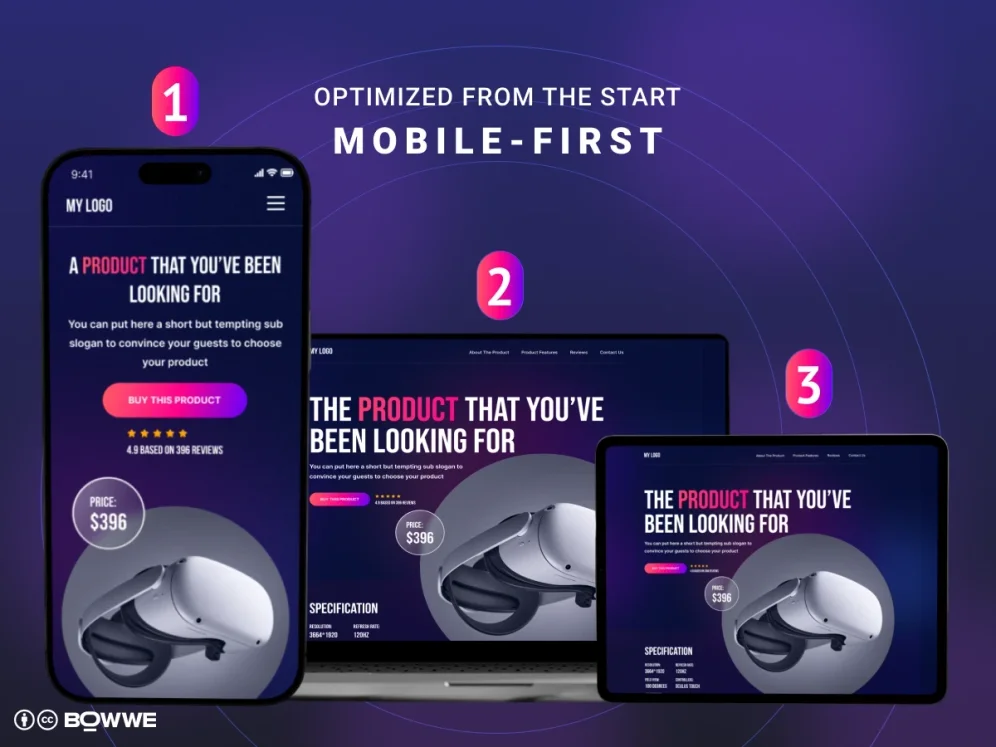
Because search engines index the mobile version of websites by default, your desktop experience is secondary. Designing for mobile-first requires:
- Thumb-Friendly Touch Targets: Buttons and links should be at least 48×48 pixels with ample spacing to prevent accidental clicks.
- Eliminating Aggressive Overlays: Full-screen popups on mobile trigger visual intrusion penalties and drive immediate bounces.
- Responsive Structural Layouts: Ensure content hierarchies collapse into single-column flows logically without hiding crucial content.
Part 5: Pillar 3 — Aesthetics and Visual Trust Signals
Visual presentation isn’t just about superficial beauty; it serves as a primary trust signal in modern web design. Within milliseconds of landing on a web page, users form an subconscious opinion regarding authority and security. Google’s quality evaluators closely align quality signals with E-E-A-T (Experience, Expertise, Authoritativeness, and Trustworthiness).
The Design Trust Imperative
An outdated layout, cluttered ad placement, low-contrast text, or inconsistent branding triggers immediate user skepticism. Even if text content is written by industry experts, poor visual design undermines user confidence, resulting in lower conversion and engagement metrics.
Visual Trust Elements Every Page Needs In Modern Web Design
- Clear Author Bio Blocks: Display real headshots, credentials, and links to verified social/professional profiles.
- Professional Editorial Styling: Use clean typographic scales, balanced line-heights (1.5–1.8), and sufficient color contrast ratios (WCAG AA standard minimum 4.5:1).
- Transparent Business Information: Accessible footer designs containing physical addresses, privacy policies, editorial guidelines, and explicit contact information.
Part 6: Common Design Traps That Harm SEO Performance
Even experienced designers can inadvertently damage search rankings when prioritizing visual flair over structural standards. Avoid these common implementation pitfalls in modern web design:

1. Text Embedded Inside Image Graphics
Placing key headlines or informational text directly into flattened JPEGs or PNGs prevents search engines from reading, indexing, and translating the content. Always render typography as native HTML styled with CSS.
2. Excessive Scroll-Triggered Animations
Heavy JavaScript scroll libraries often delay page rendering, spike main-thread execution time, and cause severe Interaction to Next Paint (INP) input latency issues on mobile hardware.
3. Infinite Scroll Without Proper Pagination Fallbacks
Infinite scrolling features that lack paginated URLs or push-state history make it difficult for search engine crawlers to discover and index deep content below the initial fold.
Part 7: Conclusion & Actionable Next Steps
Modern web design and search engine optimization are no longer distinct disciplines – they are two sides of the same coin. By unifying technical performance, user-centric interaction pathways, and visually authoritative design, you create a digital presence that search engines love to rank and users love to convert on.
Your 5-Step Execution Checklist
- 1
Run Core Web Vitals Audit: Use PageSpeed Insights and Search Console to identify LCP, INP, and CLS performance bottlenecks.
- 2
Optimize Visual Media Assets: Convert all images to WebP/AVIF formats, set explicit dimension attributes, and configure native lazy loading.
- 3
Audit Mobile Navigation & Layouts: Ensure call-to-action buttons are easily clickable with thumb controls and eliminate intrusive interstitial popups.
- 4
Enhance Above-the-Fold Content: Answer primary target search queries immediately to reduce early bounce rates and eliminate pogo-sticking.
- 5
Strengthen Visual Trust Indicators: Integrate author profile cards, ensure WCAG AA color contrast compliance, and provide transparent organizational details in the footer.